Product Updates

Every new AI tool, feature, and improvement shipping on GoStudio.ai — newest first. Page 2 of 9.

New Feature — Install GoStudio on Your Phone or Computer, and a Faster Gallery

You can now install GoStudio like an app, on your phone or your computer, and open it from your Home Screen or desktop with one tap. The gallery has also been rebuilt: it loads faster, stays steady while you browse, and lets you move from one photo to the next without closing the viewer.

  • On your computer

    Click “Get App” in Chrome or Edge and GoStudio opens in its own window.

  • On your phone

    One tap on Android, or a few short steps on iPhone and iPad, and GoStudio is on your Home Screen.

  • A faster gallery

    Loads as you scroll, no blank screens, and next and previous across every page.

What’s New

  • Install on your computer — in Chrome or Edge, click “Get App” and GoStudio installs in one click. It opens in its own window, like any other app.
  • Install on your phone — on Android, tap “Get App” to install. On iPhone and iPad, “Get App” shows you the short steps to add GoStudio to your Home Screen.
  • Opens where you left off — if you are logged in, the app opens straight to your dashboard.
  • Find “Get App” easily — it is in the header, in your profile menu and on a small floating button. It goes away once the app is installed, and on iPhone and iPad it stays hidden for 30 days after you have seen the steps.
  • A faster gallery — photos load page by page as you scroll, with placeholder cards while they arrive, instead of everything at once.
  • No more blank screens or flicker — fixed the gallery going blank, flickering when you restore a photo, and getting archive, restore and un-favourite out of sync.
  • Browse without closing the viewer — use next and previous to move through all your photos, even across pages, in the gallery and the generations panel.
  • Delete from Favourites — uploaded photos in Favourites now have a delete option too.
  • Helpful empty states — an empty gallery tab now tells you why it is empty.
  • Video fixes — rerun works for videos and Reference to Video, video thumbnails show on iPhone, and the image picker shows each video’s name.
  • Batch photos in Credit History — images made with Batch Processing now appear in your credit history.
  • Pro plan — the monthly Pro plan now includes 150 credits.

Installing the app does not change anything about your account. Your credits, profiles and photos are exactly where they were.

Open GoStudio and tap Get App
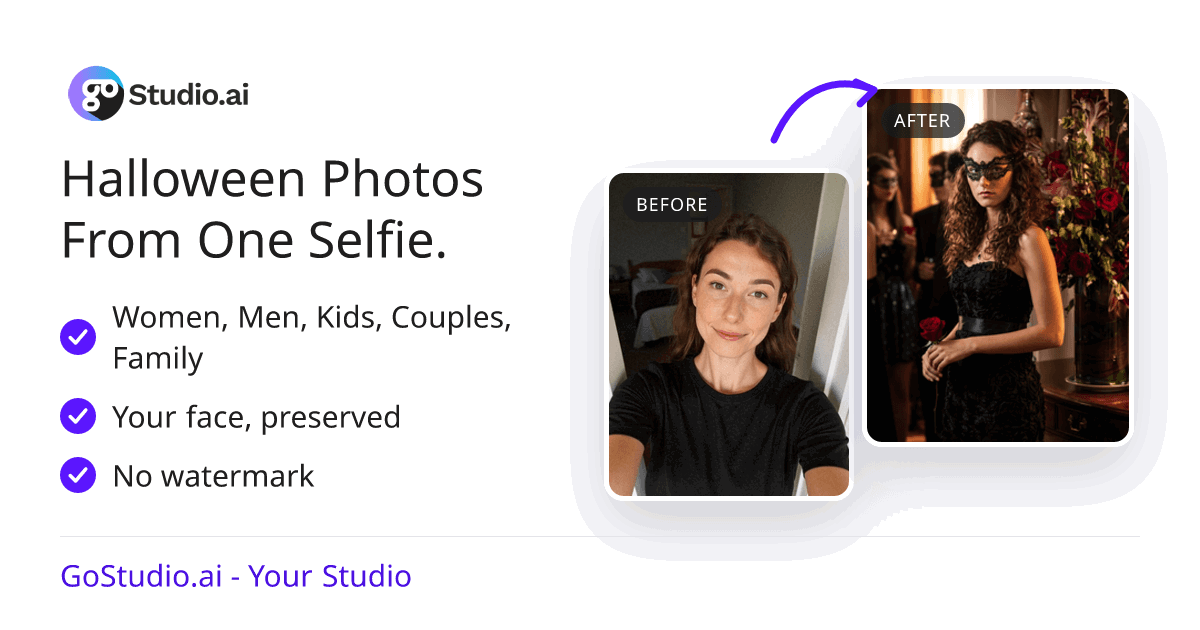
New Feature — Free Halloween Photos for You, Your Partner or Your Whole Family

Halloween is here. Pick a costume, upload a photo, and GoStudio puts you in it. It works for one person, a couple or the whole family, and you can turn the result into a greeting card. We also gave each video tool its own space in the app, so each one opens straight to the job it does.

A selfie before, and the same woman in a black masquerade costume after, made with the free Halloween photo tool

What’s New

  • Halloween Photo — choose a costume style at /free-halloween-photo and the Halloween Photo tool in the app recreates you in it.
  • For everyone in the photo — upload a photo of one person, a couple or a family, and each upload slot matches the people you can see.
  • Costume categories — browse costumes by category to find your style quickly.
  • Greeting cards — turn your Halloween photo into a card to share.
  • Halloween backgrounds — themed background pages that open the background tool on the style you picked.
  • Works on phones — the Halloween page was built for small screens first.
  • Five video tools, five workspaces — Video Watermark Remover, Video Resizer, Video Upscaler, Video Extender and Video Background Removal each open in their own panel instead of inside AI Video. AI Video keeps Reference, Edit and Create.
  • One background tool — the duplicate Background Remover in the app is now part of AI Background, and old links take you there.
Make your Halloween photo
v4.0.0

New Feature — GoStudio 4.0: One Subscription, Change Plans Any Time

New FeaturePlatform

New Feature — GoStudio 4.0: One Subscription, Change Plans Any Time

You now have one subscription, and you change it rather than buying another. Moving up or down a plan updates the subscription you already have, so you are never billed for two plans at once. There are more plans to choose from, and the billing page shows every payment and every plan you have had, with invoices you can download. Because this changes how plans and billing work, it is a 4.0.

  • One subscription

    Change plans whenever you like. You are never billed for two at once.

  • More plans

    Six new monthly and yearly tiers, listed by price.

  • Billing history

    Every payment with its invoice, and every plan with its status.

What’s New

  • One subscription — upgrading or downgrading changes your current plan instead of starting a second one.
  • Clear messages when a change does not go through — if a plan change fails, or a payment is still being processed, we tell you what happened and what to do next.
  • More plans — six new tiers: Ultra Pro and Ultra Max monthly, and Ultra, Ultra Plus, Ultra Pro and Ultra Max yearly. When you upgrade, you see every plan above yours.
  • Easier to compare — plans are listed by price, the recommended plan is never shown right next to the one you already have, and the yearly saving is shown as a single clear figure.
  • Payment History — every payment you have made, with an invoice you can download for each.
  • Subscription History — every plan you have had, with its status and dates.
  • Refresh your status — one tap on the billing page brings your plan status up to date.
  • Faster checkout — your ZIP code is filled in for you, and the back button on checkout returns you to GoStudio.
  • Group Photo: Standard and Pro — Lite is now called Standard, and the new Pro model is picked for you by default.
  • Edit up to 10 photos at once — the photo edit limit is raised to 10.
  • Image to prompt for any photo — a new General mode writes a prompt for any picture, not only portraits.
  • Edits open in the right place — videos open in the video editor and photos in the image editor, from the dashboard, the gallery and the background tools.
  • Simpler terms — the Terms of Service and Refund Policy were rewritten in plain language.
See the plans
v3.9.0

Update — A Studio Built for Your Phone

UpdatePlatform

Update — A Studio Built for Your Phone

Most people use GoStudio on a phone, so we rebuilt the studio around one. The bottom bar is gone, the menu now opens from the header, the prompt box works properly with the on-screen keyboard, and the model picker is easy to reach with your thumb. Several tools got simpler at the same time.

  • Easy to get around

    No bottom bar. The menu opens from the header and the model picker sits at the bottom.

  • Typing on a phone

    Tap the prompt box and the editor stays above your keyboard.

  • Simpler tools

    Sharpener, Noise Remover and Creative Upscale: one model and one button each.

What’s New

  • Menu in the header — the bottom bar is gone; tap the menu button at the top to open the sidebar.
  • Model picker at the bottom — it now sits in the footer, where your thumb can reach it.
  • Typing that just works — tap the prompt box and the editor opens with the keyboard, and stays above it while you type.
  • Search apps without the keyboard in the way — the apps picker opens as a sheet from the bottom of the screen.
  • iPhone menu fixed — the menu now scrolls all the way down.
  • Easier buttons on cards — expand on the left, edit and like on the right, and an info icon for the details.
  • Copy any prompt — copy the prompt behind an image straight from the viewer.
  • Close the banner — hide the top banner for the rest of your visit.
  • Simpler enhance tools — Sharpener, Noise Remover and Creative Upscale each have one model and one button.
  • Colour pages open on your colour — the red, blue, green and other colour background pages open the app with that colour already picked.
  • Your photo waits for you — upload on a background page, sign in, and your photo is still there.
  • The right price, up front — switching to Nano Banana 2 shows its real credit cost before you generate.
  • Recreate Photo — up to 10 images in Edit, and reruns work without refreshing the page.
Open the studio on your phone
v3.8.0

New Feature — Batch Processing: Edit a Whole Set of Photos at Once

New FeatureAI Tools

New Feature — Batch Processing: Edit a Whole Set of Photos at Once

Batch Processing lets you upload a set of photos and run the same edit on all of them, instead of one at a time. Start with the Watermark Remover, Weight Shift or Age Modify, run several edits one after another, and undo any step. We also brought the upscale tools together on one page and gave AI Image a clearer name.

  • Upload a set

    Add all the photos you want to edit at once.

  • Pick your edits

    Watermark Remover, Weight Shift or Age Modify, one after another.

  • Undo anything

    Step back or forward through every edit before you download.

What’s New

  • Batch Processing — upload a set of photos at /app/batch-processing and run one edit on all of them.
  • Three tools to start — Watermark Remover, Weight Shift and Age Modify, and you can switch between them inside the batch.
  • Edits that build on each other — each tool works on the result of the one before, so one batch can go through several edits in order.
  • Undo and Redo — step back or forward through every edit in the batch.
  • Your batch is kept — if you top up credits in the middle of a batch, it is waiting for you when you come back.
  • Asked, not cut short — if you do not have enough credits for the whole batch, we ask you first instead of quietly doing fewer photos.
  • Generate tells you what is missing — the Generate button waits for the fields it needs, and tells you which one.
  • One Upscale page — four separate enhancers are now one page at /upscale, with stronger SeedVR and Topaz models.
  • AI Image is now AI Editor — same tool, clearer name.
  • Templates in the menu — a Templates link replaces the old search popup.
  • Tell us what you think — a feedback button on upload pages, and live chat at the top of Need help.
  • Faster fixes behind the scenes — we now record when a batch, an upload or a payment fails, so we can spot problems and fix them sooner.
Try Batch Processing
v3.7.0

Update — Delete Your Account, Rerun Text-to-Image, and Sign in with Apple

UpdatePlatformTrust & Safety

Update — Delete Your Account, Rerun Text-to-Image, and Sign in with Apple

You can now delete your GoStudio account yourself, from settings. Rerun and Recreate work for photos made from a text prompt, and updating your card no longer touches your credits. You can also sign in with your Apple ID and turn any photo into a prompt.

  • Delete your account

    From settings, whenever you want.

  • Rerun text-to-image

    Run a text prompt again with the same settings. Pack photos are not included.

  • Credits stay put

    Updating your card no longer changes your credits.

What’s New

  • Delete your account — remove your account from settings whenever you want. Once it is deleted, it can no longer be signed into.
  • Rerun text-to-image — Rerun and Recreate now work for photos made from a text prompt, and right after a generation finishes. Pack photos are not included.
  • Card changes leave your credits alone — updating your payment method no longer adds credits by mistake.
  • Sign in with Apple — log in or sign up with your Apple ID.
  • Image to prompt — a button in the prompt bar looks at a photo and writes the prompt for you.
  • A new billing page — cleaner, and cancelling no longer sends you straight to the payment portal.
  • Thumbs-down opens a chat — it now asks what went wrong, keeps the image on screen and opens live chat with the details already filled in.
  • Help in one place — support and live chat are in the header.
  • Download is a button — on every result.
  • iPhone keyboard fix — the app stays usable while the keyboard is open.
  • Better tracking behind the scenes — we fixed and added the events that tell us when uploads and generations succeed or fail, so problems reach us sooner.
Open account settings

Showing updates 7–12 of 53